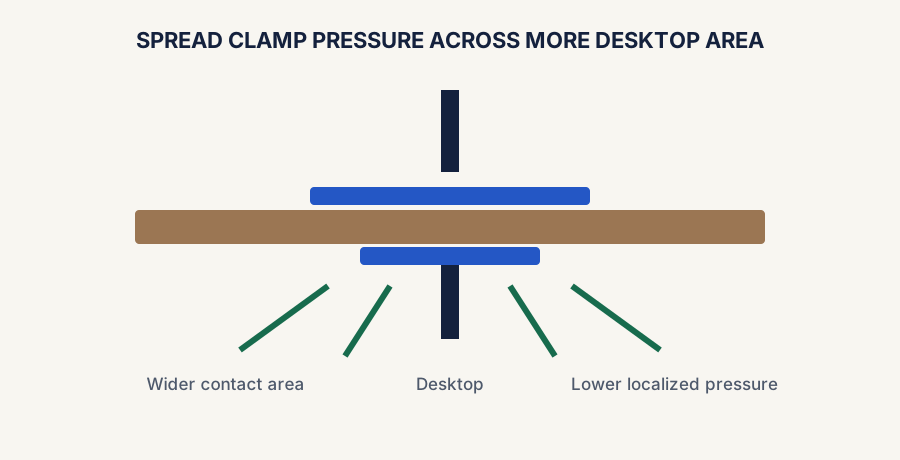
A monitor arm can free up a surprising amount of desk space, but the clamp point also concentrates force in one small area. On a strong desktop, that is usually fine. On a thin, hollow, slick, or slightly flimsy desk, a reinforcement plate can be the cheap insurance that keeps the setup stable and protects the surface.
Most people do not need to overcomplicate this. If the desktop feels solid and flat where the clamp lands, you can often skip the plate. If the desk flexes, dents easily, has a weak edge, or makes you nervous every time you tighten the mount, a plate is worth taking seriously.
This guide is for normal home-office desks and clamp-style monitor arms. It is not a workaround for glass desktops, damaged furniture, or clearly unsafe surfaces that should not carry a monitor arm at all.
A reinforcement plate spreads clamp pressure; it does not make an unsuitable or damaged desktop structurally safe.
The fastest answer
Usually no
A solid, flat desktop often does not need one
If the desk is sturdy, the clamp seats cleanly, and the surface does not flex much when tightened, a reinforcement plate is often optional.
Often yes
Thin or questionable desktops benefit from the extra support
If the desktop feels weak, compresses easily, or the clamp point seems risky, a plate can spread the load and reduce concentrated stress.
Hard stop
A plate does not magically make every desk safe
If the desk is glass, already damaged, badly warped, or obviously unstable, the safer move is to avoid arm mounting on that surface.
Signs a reinforcement plate is worth it
The desktop is thin particleboard, lightweight MDF, or another material that feels easy to crush or dent.
The desk edge flexes when you press on it or when you tighten the arm clamp.
The clamp lands near a weak spot, seam, cable cutout, or curved edge.
You plan to use a heavier monitor or an arm with a long reach that adds more leverage.
The surface finish is soft enough that you want extra protection from clamp marks.
You simply want a safer, more confidence-inspiring mount on a desk that is good enough, but not amazing.
What the plate really does
It spreads pressure, not miracles
Reduces point pressure
A plate spreads clamp force across a larger area so one small spot is less likely to get crushed or scarred.
Can improve stability
If the clamp point is the weak link, the extra surface area can help the arm feel more planted and less sketchy.
Protects the desk finish
It can help reduce bite marks, compression, and cosmetic damage where the clamp sits.
When you can probably skip it
You can usually skip a reinforcement plate if the desk is solid wood or another strong material, the edge is flat, the clamp fits squarely, and the desktop does not noticeably flex during installation. That is especially true if you are using a modest single-monitor arm instead of a heavier dual-arm setup with more leverage.
If the desk already feels overbuilt for the job, adding a plate may not change much besides cost and setup time.
When you should stay more cautious
Comparison and planning details for Do You Need a Monitor Arm Reinforcement Plate?
Desk situation
Plate advice
Why
Thin laminate or particleboard top
Usually a smart add-on
The material is more likely to compress or feel weak at the clamp point
Heavy monitor on a long arm
Often worth it
More leverage can make a weak clamp zone feel worse over time
Strong, flat wood or sturdy composite desk
Often optional
The desktop may already handle the clamp well without extra help
Glass or clearly damaged desk
Do not rely on a plate
The underlying surface is the real problem, not the lack of a spreader plate
A simple decision rule
Skip it if
The desk feels unquestionably solid
You have a flat clamp surface, low flex, and a modest setup that does not make the mount feel stressed.
Use it if
You are protecting a desk that feels borderline
If the desk is thin, soft, or just not confidence-inspiring, a plate is usually the better low-cost decision.
Walk away if
The surface is fundamentally wrong for an arm
A reinforcement plate helps distribute force, but it does not turn unsafe furniture into a safe monitor-arm mount.
Bottom line
Use the plate when the desk is the question mark
If the arm is a sensible fit but the desktop is the weak point, a reinforcement plate is usually a smart, low-drama addition. If the desk is already sturdy, you can usually keep the setup simpler and skip it.
Use the live monitor-arm paths once the desk-support question is settled
If you know the desk can handle the clamp safely, move straight to the current live overall and budget monitor-arm routes instead of reopening the buying process from scratch.
Live now · overall pick
HUANUO FlowLift Single Monitor Mount
Best first click if you want the strongest current small-desk monitor-arm path after confirming the desk support is good enough.