Yes, a monitor arm can work against a wall, but only if you stop imagining a huge floating range of motion and start thinking about the actual clearance behind the desk. The real question is not whether monitor arms and walls are incompatible. It is whether your arm, desk depth, clamp position, and screen movement all fit the space you really have.
For many small home offices, a monitor arm still helps even when the desk is close to a wall. You just need to expect a more limited setup: less rear sweep, less dramatic repositioning, and more importance placed on how the arm folds, where the clamp sits, and how much depth the monitor needs once mounted.
This guide is for normal home-office desks pushed close to a wall, not for unusual installations where the desk is bolted down, built into cabinetry, or paired with oversized multi-monitor rigs.
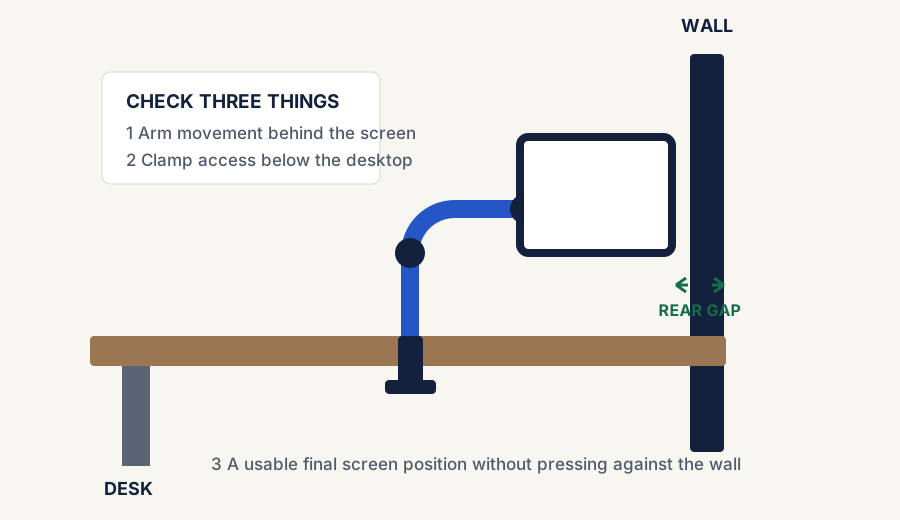
Wall-adjacent monitor-arm planning: verify movement behind the screen, clamp access, and the final viewing position.
The short answer
Usually yes
A wall does not automatically rule out a monitor arm
If the arm can clamp cleanly and the monitor can settle into a usable final position, the setup can still work well.
But
You may lose some movement range
Arms that want to swing far backward or unfold behind the desk become harder to use when the wall is tight.
Best fit
Compact arms and realistic expectations
The best wall-adjacent setups usually come from simpler, compact monitor arms rather than oversized mounts meant for wide open desks.
What actually matters near a wall
How much space exists between the back edge of the desk and the wall right now.
Whether the clamp can be installed without smashing your knuckles into the wall.
Whether the arm design folds upward or outward instead of needing a lot of rear sweep.
How thick the monitor is and how far the VESA mount sits from the front of the panel.
Whether you need frequent movement or just a cleaner fixed position than the stock stand provides.
Where people go wrong
The wall is often a setup constraint, not a deal-breaker
They expect full showroom movement
A wall-adjacent arm usually works best when you mostly want better height and desk clearance, not dramatic re-positioning every hour.
They ignore clamp access
Sometimes the screen position would be fine, but the real problem is that the clamp is annoying to install with the desk flush to the wall.
They choose too much arm for the desk
Large dual-screen or long-reach arms can create more rear-clearance drama than a modest single-arm setup.
When a wall-adjacent monitor arm usually works well
Comparison and planning details for Can a Monitor Arm Work Against a Wall?
Setup situation
Wall-fit outlook
Why
Compact single-monitor arm on a shallow desk
Often good
The arm can still free front-of-desk space even with limited rear movement
Desk has a small but usable rear gap
Usually workable
A little clearance often solves more than people expect
You mostly want the screen higher and cleaner
Usually good
You do not need huge articulation to get the main benefit
You need frequent deep repositioning
Less ideal
The wall limits how far some arms can sweep or fold
When the wall becomes the real problem
The wall becomes a real blocker when the clamp is hard to install, the arm design needs a lot of backward travel, or the final monitor position still lands too close to your face because the desk is extremely shallow. In those cases, the better answer may be a more compact arm, a small desk pull-forward gap, or even a laptop stand instead of forcing the wrong arm into the space.
A simple decision rule
Go for it if
You mainly want a cleaner, higher screen position
If a modest arm can clamp safely and settle into a useful final position, the wall is usually manageable.
Stay cautious if
You need a lot of movement from the arm
If your workflow depends on pulling, rotating, or sweeping the monitor constantly, wall clearance matters more.
Rethink it if
The clamp or rear clearance is obviously compromised
If installation itself feels bad or the arm has nowhere sensible to move, solve that layout problem before buying around it.
Bottom line
A wall changes the fit math, but does not kill the idea
A monitor arm can absolutely work against a wall when the goal is better height, better desk clearance, and a tidier small-space setup. The key is choosing an arm and clamp situation that fit the real clearance you have, instead of expecting unlimited movement from a wall-adjacent desk.
Use the live monitor-arm paths if the wall setup still works
If the desk can stay near the wall and still mount an arm cleanly, jump straight into the current live overall and budget routes instead of starting another broad product search.
Live now · overall pick
HUANUO FlowLift Single Monitor Mount
Best first stop if you want the strongest current monitor-arm path after deciding a wall-adjacent setup is still realistic.