Clamp vs Grommet Monitor Arm Mount for a Small Desk
A monitor arm can transform a cramped desk, but the mount style matters more than many people expect. A clamp mount is usually the easiest answer. A grommet mount can be cleaner and more locked-in when the desk supports it. The better choice depends on what kind of edge access, cable holes, and desk strength you actually have.
For most remote workers, clamp mounting is the default because it is simpler and more flexible. Grommet mounting becomes more interesting when the desk already has a suitable pass-through hole or when rear-edge access is awkward.
This guide focuses on practical small-desk setups where monitor-arm fit, desk protection, rear clearance, and installation simplicity matter more than enterprise installation standards.
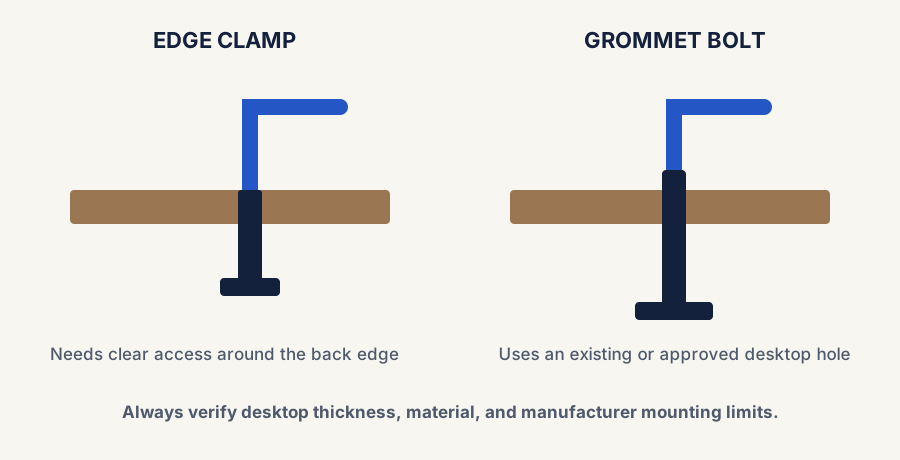
Clamp mounts need clear rear-edge access; grommet mounts use an existing or approved hole through the desktop.
The quickest difference
Comparison and planning details for Clamp vs Grommet Monitor Arm Mount for a Small Desk
Mount type
Best for
Main tradeoff
Clamp mount
Most desks with usable rear or side edge access
Needs enough edge shape and clearance to clamp safely
Grommet mount
Desks with a suitable cable hole or dedicated mounting cutout
Less flexible if the hole location is awkward or missing
Default answer first
Why clamp mounting is usually the safer starting point
It works on more desks
If the back edge is usable and the desktop is solid enough, clamp mounting is often the simplest path.
It is easier to reposition
A clamp gives you more freedom to move the arm if the first placement is not ideal.
It avoids depending on a hole location
Many desks either do not have a grommet hole or place it where the arm position is less helpful.
Choose grommet on purpose
When grommet mounting makes more sense
The desk already has the right hole
If there is a well-placed cable pass-through or mounting hole, a grommet setup can feel cleaner and more intentional.
Rear-edge clamping is awkward
Some desks have rails, lips, or wall placement that make clamp access inconvenient or impossible.
You want a more locked-in central mount
A good grommet position can create a cleaner fixed base point, especially in more permanent setups.
What to check before choosing either one
Whether the desk edge is clear enough for a clamp to seat flat and tighten safely.
Whether the desk already has a grommet hole in a location that actually helps the monitor placement.
Whether the desktop feels sturdy enough or needs a reinforcement plate.
Whether the desk is pushed against a wall, which can affect clamp access and rear clearance.
Whether you may want to move the arm later instead of locking into one mounting point.
A simple decision rule
Choose clamp if
You want the easiest, most flexible answer
Your desk edge is usable, you may want to tweak placement, and there is no perfect reason to depend on a grommet hole.
Choose grommet if
The desk already supports it well
You have a suitable hole in a good location or a clamp mount would be awkward because of the desk design or wall position.
Stay cautious if
The desktop feels weak or oddly shaped
If the desk edge, hole, or material feels questionable, solve the support issue before forcing either mount style.
Best next reads
Use these pages after choosing the mount direction
Go here if routing cables is part of the reason you are trying to mount the monitor more cleanly.
Final takeaway
Clamp mounting is usually the best default because it fits more desks and makes placement changes easier. Grommet mounting becomes the better choice when the desk already supports it cleanly or clamp access is compromised. The best answer depends less on theory and more on the real edge, hole, and clearance situation of the desk in front of you.
Ready to shop?
Start with the current live monitor-arm paths
If this guide helped you settle on the mount direction, jump straight to the live overall and budget shopping paths instead of starting the category from scratch.
Live now · overall pick
HUANUO FlowLift Single Monitor Mount
Best first click if you want the strongest current all-around monitor-arm path for a small desk after deciding clamp mounting is workable.