Can You Use a Laptop Stand with an External Monitor?
Yes — and for many remote workers, that is one of the most practical ways to build a flexible desk. A laptop stand can lift the laptop screen into a better position while an external monitor handles the main view, extra windows, or task-specific work. The setup can work especially well if the desk still has enough room for a separate keyboard and mouse.
The catch is that not every desk benefits from two raised screens. On small or shallow desks, a laptop stand plus an external monitor can quickly turn into a crowded rear edge. The best answer depends on whether the second screen actually improves your workflow or just adds another object to manage.
This guide focuses on the practical question: should the laptop stay active on a stand alongside an external monitor, or should the monitor become the clear main screen while the laptop plays a smaller supporting role?
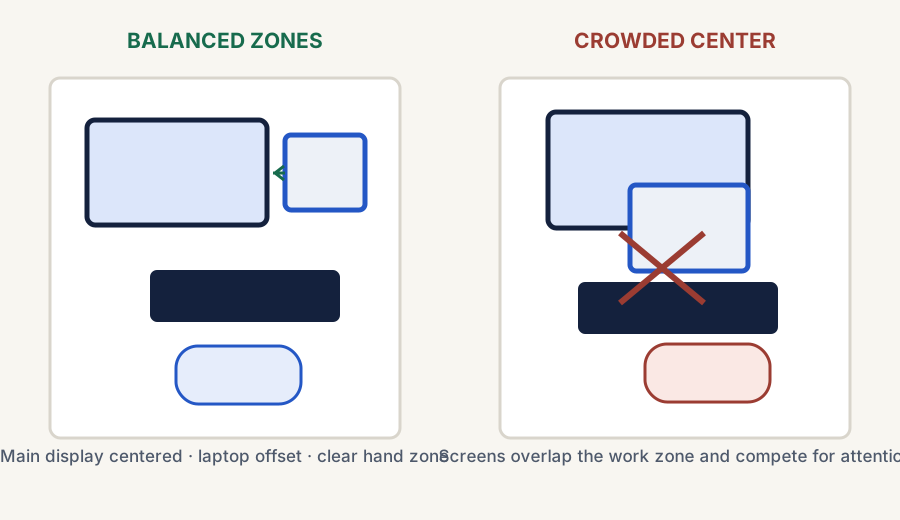
A balanced layout gives the external monitor a clear role, offsets the laptop, and preserves a usable keyboard-and-mouse zone.
The short answer
Usually yes if
The external monitor and laptop have clearly different jobs
The setup works best when one screen is obviously primary and the other supports reference material, chat, email, or overflow tasks.
Usually no if
The desk cannot comfortably support two raised screens
If the setup feels cramped, visually busy, or hard to position, forcing both screens into the space is often the wrong move.
Best rule
Choose a clear screen hierarchy
A laptop stand with an external monitor works best when you know which screen is central and which screen is secondary.
Can a laptop sit under a monitor?
Usually, an open laptop works better beside the monitor than directly under it. A below-the-monitor position can leave the laptop screen too low to use comfortably and can steal the keyboard space that makes a raised-laptop setup practical.
If the external monitor is the only active screen, the simpler answer is to give it the main position and keep the laptop out of the daily work zone. If both screens need to stay active, place the laptop on a stand beside the monitor, choose a clear primary screen, and leave a real typing area in front. Desk layouts have enough unsolicited opinions already.
Why this setup can work well
It adds more usable screen space without requiring a full dual-monitor desk.
It keeps the laptop visible for communication apps, notes, or overflow windows.
It can help hybrid workers keep one setup that still travels well.
It often works better than leaving the laptop flat beside the monitor.
It creates a cleaner line of sight if the laptop screen is raised intentionally.
What matters most
The setup works only when the desk stays readable and usable
One screen should lead
If both screens fight for the same level of attention, the setup often feels more distracting than helpful.
The keyboard still needs room
A laptop stand plus monitor usually works best when a separate keyboard and mouse have enough real working space.
Desk depth can make or break it
On shallow desks, two screens can dominate the rear edge and make everything else feel compressed.
Common ways to use the two-screen setup
Comparison and planning details for Can You Use a Laptop Stand with an External Monitor?
Setup style
Usually best for
Main tradeoff
Monitor as primary, laptop as side screen
Most remote-work setups
The laptop can become underused if it is positioned awkwardly
Laptop centered, monitor secondary
People who still work mainly from the laptop
The monitor may feel less integrated into the workflow
Both screens treated equally
Niche layouts with enough desk space
Can feel visually busy and harder to align well
When this setup is probably the wrong call
If the desk is already shallow, the external monitor is large, or the laptop stand pushes the keyboard too far forward, the setup may not be worth forcing. In those cases, a better answer is often to make the external monitor the main screen and simplify the laptop's role — or rethink whether a monitor arm would use the space better.
This is also a bad fit if you are trying to keep the setup extremely portable or minimal. Two active screens almost always mean more cable management, more positioning decisions, and more visual weight on the desk.
A simple decision rule
Use both if
The second screen clearly earns its place
If the laptop screen regularly handles useful secondary work, the raised-laptop-plus-monitor setup can be very effective.
Simplify if
The desk feels cramped or confused
If both screens compete for attention or crowd the keyboard zone, reduce the complexity before adding more gear.
Re-evaluate if
You are really solving a space problem, not a screen problem
If reclaiming desk depth is the main goal, a monitor arm may outperform a laptop-stand-plus-monitor arrangement.
Bottom line
Yes, you can use a laptop stand with an external monitor — if the screens have distinct roles and the desk can support them
This setup works well when the monitor is clearly primary or the laptop is clearly secondary, the keyboard and mouse still fit naturally, and the desk does not feel overloaded by two raised screens. If those conditions are missing, simplify the setup before adding more hardware.
Go here if the setup works in principle and the next question is whether the raised laptop should sit beside the monitor or stay out of the main screen line.
Go here if the real blocker is limited desk depth, not whether the laptop and monitor can technically work together.
Ready to shop?
Start with the current live laptop-stand paths
If this guide settled the mixed-screen question for you, jump straight into the live shopping block or use the fastest current overall and budget routes instead of restarting the category from scratch.
Live now · overall pick
Roost V3
Best first click if you want the strongest current laptop-stand fit for hybrid movement between locations while keeping the laptop active beside a monitor.
Some links on this page may be affiliate links. See the affiliate disclosure and use the contact page for corrections or business inquiries.
Sources and verification
Primary references
Authoritative workstation guidance supporting laptop, monitor, and peripheral placement. These are non-affiliate references; current product details should still be checked before purchase.