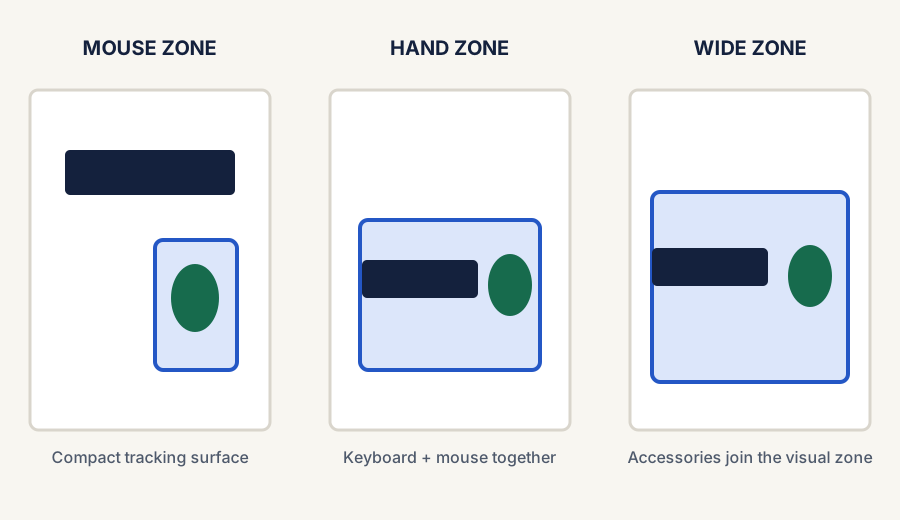
The right desk mat does not just depend on material or price. Size changes how the desk actually works. A mat that is too small can feel pointless, while a mat that is too large can crowd a shallow desk and make the setup feel heavier instead of cleaner.
For most remote workers, the best desk-mat size is the one that gives the keyboard and mouse a clear shared work zone without swallowing the whole surface or forcing other daily items into awkward positions.
This guide focuses on practical desk-mat sizing decisions for remote-work desks, especially smaller setups where every inch of surface area matters.
Choose coverage by the work zone you want to define—not by the largest mat that fits on the desktop.Start with desk behavior
What the desk mat needs to cover
Desk mats work best when they match the way you use the desk, not just the dimensions printed on a product page.
Keyboard plus mouse zone
If both the keyboard and mouse need to sit on the mat, you need more width than a simple mouse surface.
Mouse-only coverage
If the real goal is just smoother tracking, a full desk mat may be unnecessary and a compact pad may be the better fit.
Visual definition
Some desk mats are less about tracking and more about giving the whole setup a calmer, more intentional work zone.
Desk depth limits
On shallower desks, front-to-back depth matters as much as width because oversized mats can push everything too close to you.
A simple way to choose the size
Comparison and planning details for How to Choose the Right Desk Mat Size
Desk-mat approach
Best for
Main tradeoff
Compact mat or mouse pad
Very small desks and minimal setups
Does not visually anchor the whole desk
Keyboard-and-mouse coverage
Most remote-work setups
Needs enough width to avoid cramped mouse movement
Wide desk mat
Cleaner, more styled setups with more surface room
Can crowd shallow desks if depth is too large
Oversized full-zone mat
People who want the desk mat to define the whole workspace
More expensive and easier to overbuy
The fastest fit checks
Measure the clear desk width after any lamp bases, stands, or permanent accessories.
Check whether the keyboard and mouse both need to live on the mat every day.
Leave some exposed desk surface around the mat so the setup still breathes visually.
On shallow desks, be extra careful with mat depth so the keyboard does not end up too close to the desk edge.
If you already feel cramped, do not assume a larger mat will fix the problem.
Best size by desk situation
How to think about common desk setups
Very small desk
Stay compact
Choose a smaller mat or mouse-focused surface if the desk is already fighting for depth and every object feels close.
Typical home-office desk
Cover keyboard and mouse
This is the safest middle-ground choice because it creates a clear work zone without swallowing the whole desk.
Design-first setup
Go wider on purpose
A larger mat makes sense if the desk has room and you want the mat to visually organize the full setup.
When a larger desk mat helps
A larger mat makes sense when the desk feels visually scattered, the keyboard and mouse move across different surfaces, or you want a cleaner single-zone look. It is also useful when the desk has enough depth that a larger surface will not push your hands or devices too close to the front edge.
When a smaller desk mat is smarter
A smaller mat is usually the better choice on shallow desks, narrow desks, or setups where you already have too many objects competing for space. In those cases, a smaller mat can improve feel and mouse control without turning into another oversized object on the desktop.
Use this next if the desk mat is only one part of a messier-looking setup.
Final takeaway
The best desk-mat size is usually not the biggest one that fits on the desk. It is the size that supports your keyboard and mouse well enough, leaves the setup feeling calmer, and still respects the real depth and breathing room of the workspace.
Ready to shop?
Start with the current live desk-mat paths
If this guide settled the sizing question for you, jump straight into the live shopping block or use the clearest current overall and budget desk-mat routes instead of reopening the whole category.
Live now · overall pick
YSAGi Leather Desk Protector
Best first click if you want the strongest current full desk-mat route after deciding you need real keyboard-and-mouse coverage.