Heavy multitasking
If you constantly switch between communication tools and focused work, a second screen can reduce window juggling.
A dual-monitor setup can make remote work feel dramatically easier if your job involves spreadsheets, email, chat, documents, research, dashboards, or frequent context switching. But adding a second screen is only a good upgrade when the desk, monitor sizes, and mounting plan still make the workspace feel usable.
For many people, the problem is not whether two screens help. It is whether two screens make a small desk feel crowded, awkward, or visually overwhelming. The answer depends on how you arrange them and whether you actually use both displays well during the workday.
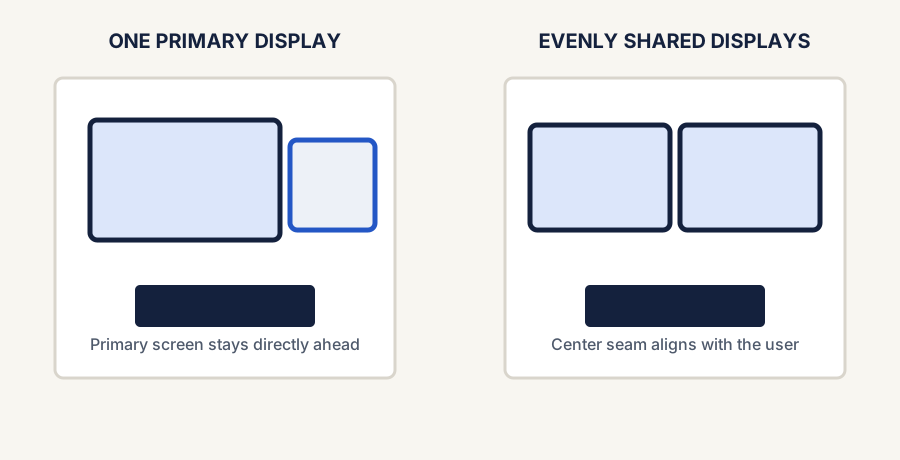
If you constantly switch between communication tools and focused work, a second screen can reduce window juggling.
Keeping notes, source material, or dashboards visible on one screen while working on the other is one of the clearest dual-monitor benefits.
One screen for the call and one for documents or tasks can make meetings less disruptive.
Dual monitors make more sense when the desk is a regular workstation instead of a quick temporary laptop stop.
| Decision | Why it matters |
|---|---|
| Screen size pairing | Two oversized monitors can overwhelm a small desk fast. |
| Main-screen position | If one display is your primary screen, it should stay centered rather than forcing constant neck turn. |
| Mounting approach | Arms or risers can reclaim space, while bulky stock stands often make dual monitors feel worse on small desks. |
| Cable management | Two displays usually double visible cable mess unless routing is planned. |
| Laptop integration | If a laptop is also part of the setup, think through whether it becomes a third screen or stays closed and docked. |
If you use one screen for focused work and the second for reference, communication, or monitoring tasks, the setup is probably earning its space. If the second screen mostly holds clutter, duplicate tabs, or idle windows, the desk might work better with one better-positioned display instead.
A dual-monitor setup is worth it when it supports the way you actually work, not just when it looks more impressive. If you use the second screen with intention and keep the layout compact, two monitors can make remote work feel smoother. If the desk is already strained, fixing the existing setup may help more than adding another display.
Authoritative workstation guidance supporting the display-placement principles in this guide. These are non-affiliate references; current product details should still be checked before purchase.