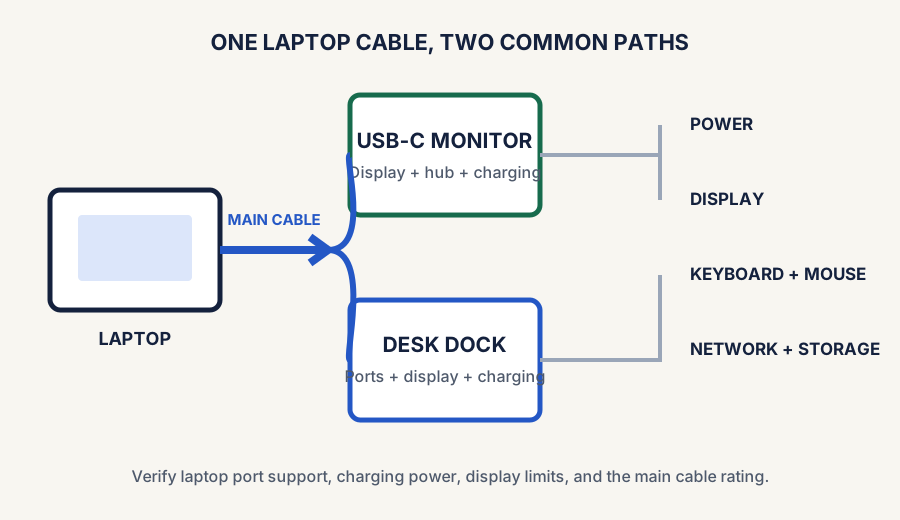
A single-cable solution lets a laptop connect to power, a display, and desk accessories through one main USB-C or Thunderbolt cable. Instead of plugging in a charger, monitor, keyboard, webcam, and adapters one by one, the desk stays assembled while the laptop remains easy to take with you.
This can make a desk feel calmer, reduce cable mess, and make it much easier to switch between work mode and travel mode. But the idea only works well if you understand the basics first. Not every port, hub, or monitor can deliver the same result.
This guide is a planning framework for cleaner desk setups. Check your laptop’s exact USB-C or Thunderbolt capabilities before buying a dock or monitor around the single-cable idea.
The two common paths use either a USB-C monitor with hub features or a separate desk dock as the connection center.
What a single-cable setup actually means
In the simplest version, one cable from your laptop connects to a dock or monitor that handles several jobs at once:
Charging the laptop
Sending video to an external display
Connecting accessories like a keyboard, mouse, webcam, or ethernet adapter
Reducing the number of visible cables on the desk surface
The experience feels better because the desk stays assembled, while the laptop becomes the only thing that moves in and out. Once the connection works, keep the external monitor centered when it is the primary screen; see where to put a laptop when using a monitor for the layout decision.
The two common single-cable solutions
Comparison and planning details for Single-Cable Desk Setup: A One-Cable Laptop Guide
Connection path
Best fit
What to verify
Laptop → USB-C or Thunderbolt dock → monitor and accessories
You need several ports, wired ethernet, or flexibility to change displays later.
The dock supports your display count and resolution, delivers enough charging power, and works with your laptop’s port capabilities.
Laptop → USB-C monitor with hub features
You want the display to be the center of a minimal desk with fewer separate boxes.
The monitor can charge the laptop, carry video over USB-C, and connect the accessories you use every day.
A small travel hub can also work for a light setup, but it may not provide enough charging power, display support, or ports to act as a permanent one-cable desk solution. See the USB-C dock guide if you need help choosing the middle device.
Single-cable compatibility checklist
Laptop port: confirm the exact USB-C or Thunderbolt port supports the display output and charging behavior you need.
Charging power: compare the laptop’s power needs with what the dock or monitor can deliver to the laptop.
Display support: verify the number of monitors, resolution, and refresh rate supported by the complete laptop-and-dock path.
Accessory ports: count the keyboard, mouse, webcam, ethernet, audio, and storage connections that stay on the desk.
Main cable: use a cable rated for the required data, video, and charging features rather than assuming every USB-C cable is interchangeable.
Operating-system limits: check the laptop maker’s documentation for multi-display and docking restrictions before buying.
Start here
How to connect a laptop to a desk setup
List the devices that remain at the desk: display, charger, keyboard, mouse, webcam, ethernet, and storage.
Choose the connection center: a dock for more ports and flexibility, or a USB-C monitor for a more minimal setup.
Check the laptop, connection center, and main cable together for charging power, video output, and the display count you need.
Connect the fixed desk devices to the dock or monitor, then test the one-cable laptop connection before tidying the cable route.
That order matters: a USB-C connector alone does not guarantee charging, video, or the same accessory support. The cable is the handshake, not a magic wand.
Compatibility first
Single-cable desk setup FAQ
How do I connect a laptop to a desk setup?
Connect the desk devices to a compatible dock or USB-C monitor, then connect the laptop with one cable that supports the required charging and video features. Confirm the whole path before treating it as a permanent setup.
What counts as a single-cable solution?
One main USB-C or Thunderbolt cable can connect a laptop to a dock or compatible monitor. It is only a complete solution when that path also handles the charging, video, and accessories you actually use.
Can one cable charge and run a monitor?
Often, but only when the laptop, cable, and dock or monitor support the necessary power and display features. Check all three; USB-C connectors do not guarantee the same capabilities.
Dock or USB-C monitor?
Choose a USB-C monitor for a simpler desk when its hub and charging are enough. Choose a dock when you need more ports or flexibility. Either way, verify the full connection path before buying.
The three pieces that matter most
Laptop port support
Your laptop has to support the combination of charging, display output, and accessory connectivity you want. This is the first thing to verify.
Dock or monitor capability
Some docks focus on ports, some on charging power, and some monitors include USB-C hub behavior built in. The setup only feels seamless if the middle device supports your needs.
Real daily workflow
If you constantly plug in extra devices manually anyway, the single-cable promise breaks down. Build around the gear you use every workday.
When a single-cable desk setup is worth it
Comparison and planning details for Single-Cable Desk Setup: A One-Cable Laptop Guide
Good fit if…
Why it helps
You dock and undock a laptop often
One cable saves time and reduces setup friction every day.
You want a cleaner desk
Fewer visible cable changes make the setup easier to maintain.
You use the same accessories every day
Keeping keyboard, mouse, display, and charging routed through one system makes sense.
You work in a small space
Simpler routing and fewer repeated plug-ins help the desk feel calmer.
Common mistakes
Assuming every USB-C port supports the same features.
Buying a dock before confirming charging and display needs.
Ignoring cable quality for the main connection.
Adding too many accessories to a setup that really only needs a few essentials.
Expecting one tiny hub to replace a full desk workflow without tradeoffs.
Make the desk work, too
A one-cable connection does not solve a crowded screen layout
After the dock or monitor path checks out, decide where the external display will sit. A monitor arm can free desk surface and simplify cable routing when its listed monitor, desk, clamp, and clearance requirements fit; compare the options before choosing one.
Best next category if the laptop position still feels ergonomically wrong after the connection flow improves.
A simple way to plan it
List what the laptop needs when docked: charging, one monitor, two monitors, ethernet, webcam, microphone, storage, or all of the above.
Count the devices that truly stay on the desk.
Decide whether a dedicated dock or a USB-C monitor with hub features makes more sense.
Keep the visible cable path simple so the setup still feels cleaner once assembled.
Test the workflow around your real daily routine, not an idealized one.
Final takeaway
A single-cable desk setup is most useful when it removes repeated friction from a laptop-based workflow. If your laptop supports it and your desk uses the same core accessories every day, the setup can feel cleaner, faster, and much less annoying. The key is verifying compatibility first and building around what you actually use.
Some links on this page may be affiliate links. See the affiliate disclosure and use the contact page for corrections or business inquiries.
Sources and verification
Primary references
Standards-body references supporting the USB-C video, power, and cable-verification principles in this guide. These are non-affiliate references; current product details should still be checked before purchase.